Commercial Key Control Checklist for Utah Businesses
A missing record can be as important as a missing key.
You may know where your spare keys are stored. But do you know who has every key, what each one opens, and whether copies were made?
For businesses, those gaps can create real security problems. A former employee may still have a copy. A contractor’s key may open more doors than needed. An unmarked spare may leave your staff guessing during an emergency. Payson Lock & Key has been helping Utah businesses manage their business keys since 1995.
Commercial key control means keeping track of your keys and setting clear rules for their use. Use this checklist to spot gaps and assign practical fixes.
Your 12-Question Audit
Review these questions with the person who manages your building. Record each answer. If you cannot confirm something, mark it as unknown.
1. Who owns the register?
Assign one person to maintain your key register and a backup to help. The register should list keys, holders, and door access.
Without a clear owner, updates get missed. A key handed out today may never reach the spreadsheet tomorrow.
2. Which doors are keyed?
List every door that uses a key, including entrances, offices, storage and mechanical rooms, and separate buildings.
Give each door a simple ID. Check the actual locks instead of relying on old plans or memory.
3. Who holds each key?
List every employee, manager, cleaner, contractor, vendor, or neighboring tenant with a key.
Ask each person to confirm what they have. Compare their answers with your records and investigate any difference.
4. What does each key open?
Record whether each key opens one office, several doors, or the whole building.
Have an approved staff member or locksmith check access. Pay close attention to master keys because one missing key could affect many rooms.
5. How are keys labeled?
Use simple key IDs that match your register. Avoid labels such as “Front Door—123 Main Street,” which could help someone use a lost key.
Keep door and access details in a secure record. A key number should help staff track it without giving strangers a map.
6. Who approves duplicates?
Choose who can approve new keys and extra copies. Require approval before a key is ordered or cut.
Record the reason, approval date, and recipient. Staff should know exactly how to request another key.
7. Where can copies be made?
Determine whether someone can copy your keys at a hardware store or kiosk and how much control your business has over that process.
A “Do Not Duplicate” stamp alone does not reliably prevent copies. Ask your locksmith how your current system handles duplication and what stronger options are available.
Take Control of Key Copies
Find out how restricted keys can help limit unauthorized duplication.
Learn who can approve copies and where they can be made.
8. Where are spares stored?
Store spare keys in a locked cabinet or another secure location. Limit access.
Record when a spare is removed, who takes it, and when it returns. A shared drawer makes it difficult to tell whether a key is missing.
9. How are contractors handled?
Give contractors access only to the areas they need and set a return date when issuing a key.
Record the worker’s name and company. Do not assume a vendor will track your keys for you. For repeat visits, consider whether scheduled electronic access would be easier to manage.
10. How are returns recorded?
When someone leaves or changes jobs, record which keys they return and the date. Check the key IDs against your register.
A returned key closes one record but does not prove that no copies exist. Note missing keys and decide whether the affected locks need attention.
11. What triggers a rekey?
Set rules before a problem occurs. Possible triggers include a lost master key, an unreturned key, an unknown copy, or signs of unauthorized entry.
The right response depends on what the key opens and the risk involved. Some situations call for prompt action instead of waiting for the next audit.
12. When is the next audit?
Schedule the next review and assign an owner. Also update records whenever keys are issued, returned, lost, or replaced.
Regular checks help catch small gaps before they become larger problems. Choose a schedule that fits your staff turnover and building use.
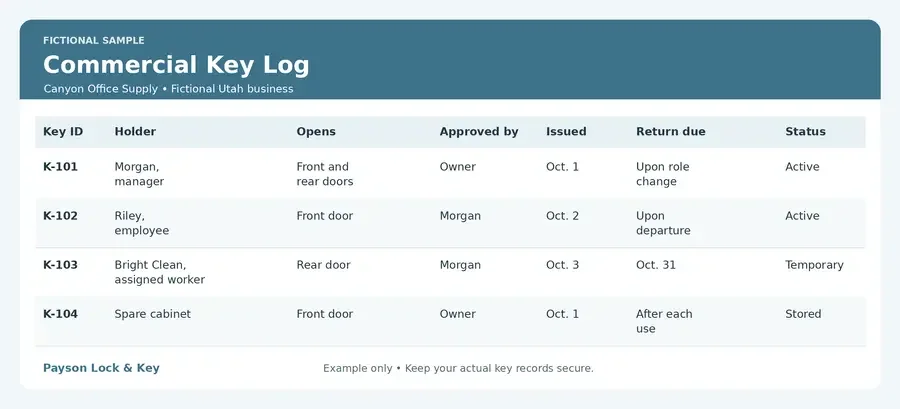
Fictional Sample Key Log
The sample below is for a fictional Utah business called Canyon Office Supply. It shows how a simple log can connect each key to its holder and approved access.
Put Your Key Records to Work
A useful key log connects each key to a person, approved doors, and a return date.
Ask Payson Lock & Key how to improve your current records.
Keep a separate door list if needed. Limit access to the log, and include a place to record returns, losses, and follow-up work.
Turn Unanswered Questions Into an Action List
An audit helps only when someone acts on the results. Turn every unknown or problem into a task with an owner and deadline.
For example, “We do not know who has the storage-room key” needs a clear next step: “Morgan will confirm all storage-room key holders by Friday.”
Handle the highest risks first. A missing master key deserves faster attention than a label that needs updating.
Your action list might include:
Confirm every active key holder.
Collect overdue contractor keys.
Move spares into a locked cabinet.
Set written rules for duplicate requests.
Ask a locksmith to assess a missing key.
Schedule the next review.
Close each task only when the work is confirmed. Then update the register so the same question does not return at the next audit.
When Restricted Keys, Master Keying, or Electronic Access May Help
Better records are a strong start. The right hardware can also make commercial key control easier.
Restricted keys may help when you need more control over copies. Depending on the system, duplication is limited through controlled key blanks and an approval process. Ask who can make copies and how requests are checked.
Master keying may help when managers need access to several rooms while staff need fewer doors. It can reduce the number of keys carried. However, master keys need careful tracking because they open more areas.
Electronic access may help when staff changes are frequent or contractors need access at set times. Depending on the system, you can remove a credential, set schedules, and review access events. Any backup mechanical keys still need records.
These options can work together. The best choice depends on your doors, daily needs, and budget.
Frequently Asked Questions
Does collecting keys eliminate copies?
No. Collecting keys is important, but someone may have made an extra copy. Review what the key opens and how easily it could be copied. If access is uncertain, ask your locksmith whether rekeying or another change is needed.
How often should records be reviewed?
Update records whenever a key changes hands. A quarterly review is a practical starting point for many businesses. Review more often if staff changes are frequent, keys go missing, or sensitive areas are involved.
Can existing locks be retained?
Often, yes. Some locks can be rekeyed or fitted with compatible cylinders. Others may need replacement because of their condition or design. A locksmith can inspect your hardware and explain which parts can stay.
Request a Key-Control Review
A complete key-control review can help your business reduce unauthorized access, avoid unnecessary rekeying costs, and give managers a reliable record of who can enter each area. It can also identify practical improvements before a lost key, employee departure, or contractor issue becomes an urgent security problem.
Start by gathering your current key register, door list, and any records of lost, returned, or duplicated keys. Then contact Payson Lock & Key to schedule a review. We can help identify gaps, verify what your keys open, prioritize the highest risks, and recommend a plan that fits your building and budget.
Close the Gaps in Your Commercial Key Control
Payson Lock & Key helps businesses across Utah County and Central Utah review keys, locks, and access needs.
Get recommendations that fit your building and budget.
Learn more about our commercial locksmith services in Utah.